SafeRedact
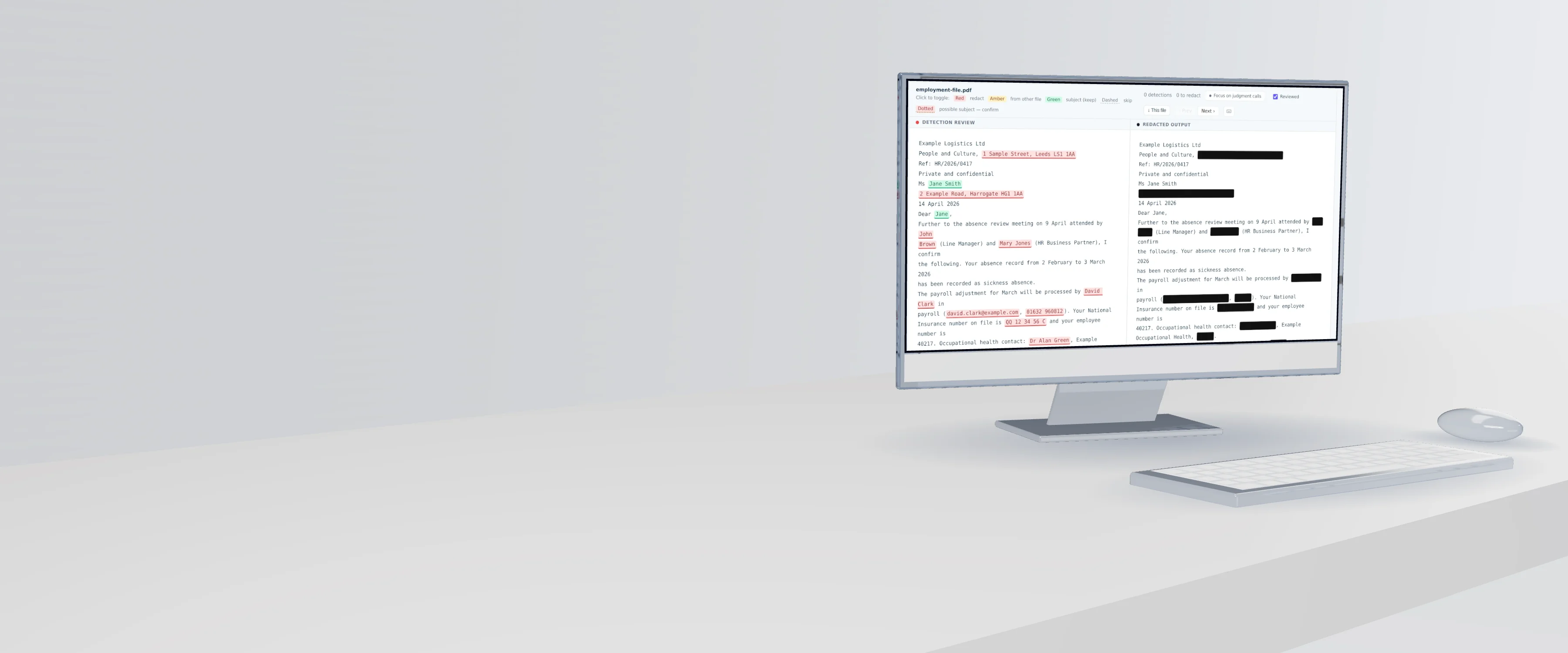
A rendered glass display on a desk showing the SafeRedact review screen for a sample HR letter: third-party names and addresses marked for redaction, the requester's own name kept, and the redacted output beside it

Redact your DSAR exports at scale.

SafeRedact redacts thousands of files across mailboxes, drives and exported chats, leaving the requester's own data intact. It runs on your own machine with no upload of source documents, and every case ships with an audit trail.

Every screen on this page is a sample case. The people, organizations, addresses and reference numbers in it are invented.

For enterprise DSARsBulk redaction with case management and an audit trail.

For single document redactionOne document, in your browser. Day pass or subscription.
317 millioncharacters of live DSARs processed to date
2 GBper mailbox file, up to 25,000 messages, opened in the browser
933,000AI detections processed and reviewed in a single case
55end-to-end checks passed twice by every release before it ships

From live subject access requests and SafeRedact's own scale testing. How each figure was measured is on the Trust page.

For organizations answering data subject requests under GDPR, UK GDPR, CCPA and other privacy laws

SafeRedact is DSAR redaction software that runs in the browser.

It processes a whole data subject access request export across 11 file types, preserves the requester's own information, redacts other people's personal data after a reviewer has decided each detection, and writes an audit trail and a review decision log into every export.

What goes in
A whole export: Purview packages, PST mailboxes, SharePoint and OneDrive files, exported chats.
Where it runs
In the reviewer's browser. Source documents are never uploaded.
What comes out
A disclosure pack for the requester and an internal audit folder with the trail and the decision log.

One case

The whole DSAR export at scale, not one document at a time.

Mailboxes become messages with their attachments, archives unpack in the browser, and the entire export runs with one review and one download. Cases of several thousand files run this way.

How a Purview export runs
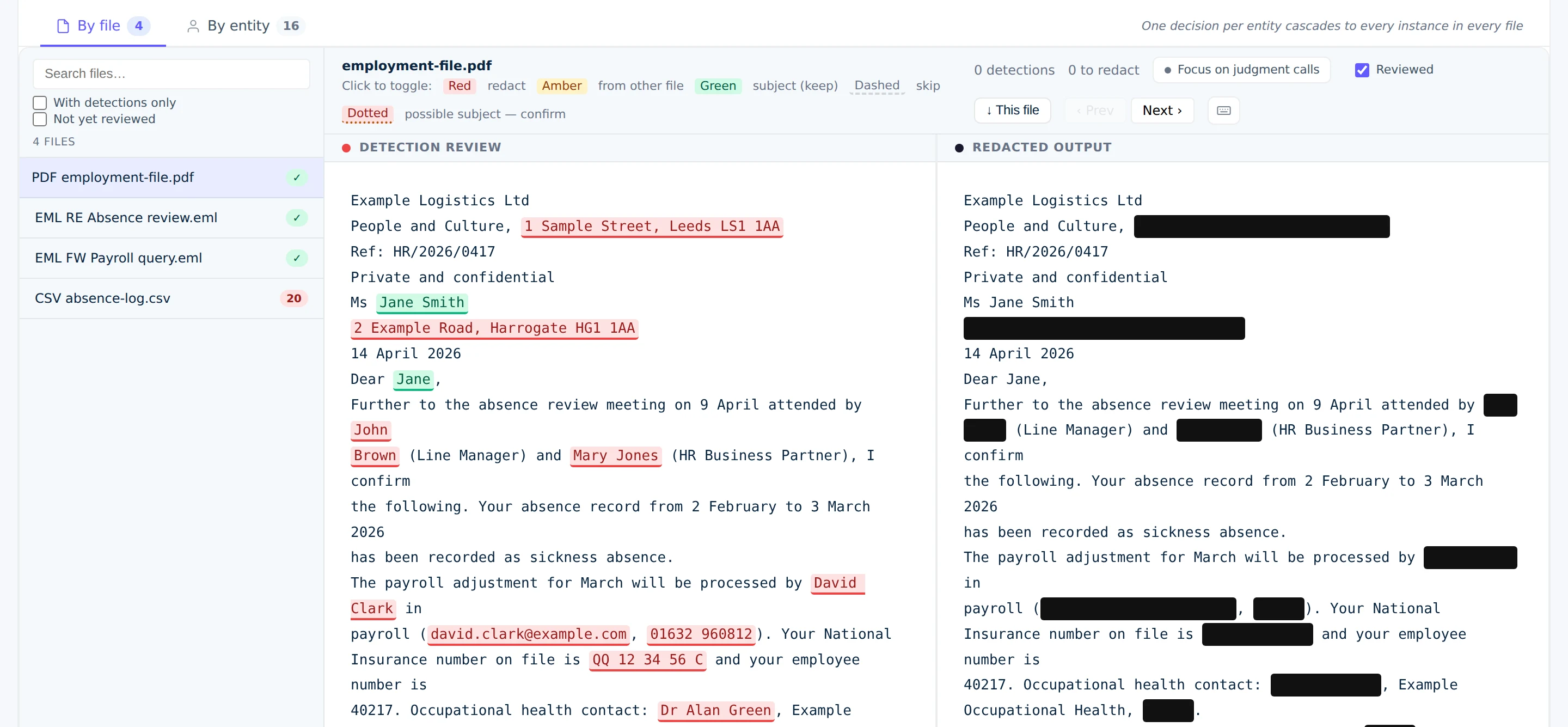
Review by file
SafeRedact review by file: a four-file sample case with detections marked in the source and the redacted output beside it

One decision

Decide a name once. It applies everywhere.

Every detection is accepted, rejected or added by a reviewer, by entity or by file. A decision on a person cascades to every instance in every document, and export waits for the reviewer's attestation.

How review works
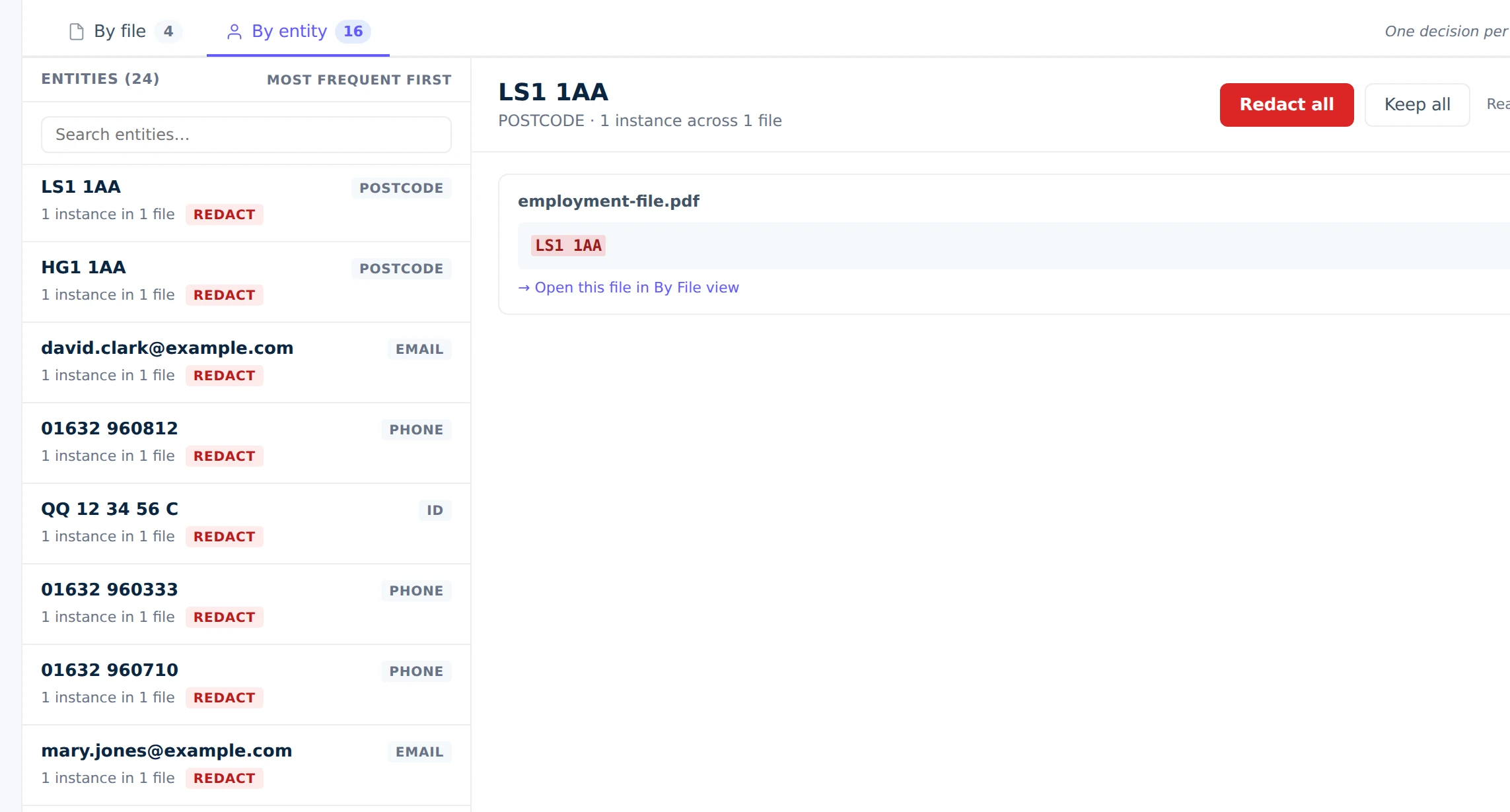
Review by entity
SafeRedact entity view listing sample postcodes, emails, phone numbers, a National Insurance number and names with a Redact all or Keep all decision for each

Before sign-off

Know where the AI detections need a human eye.

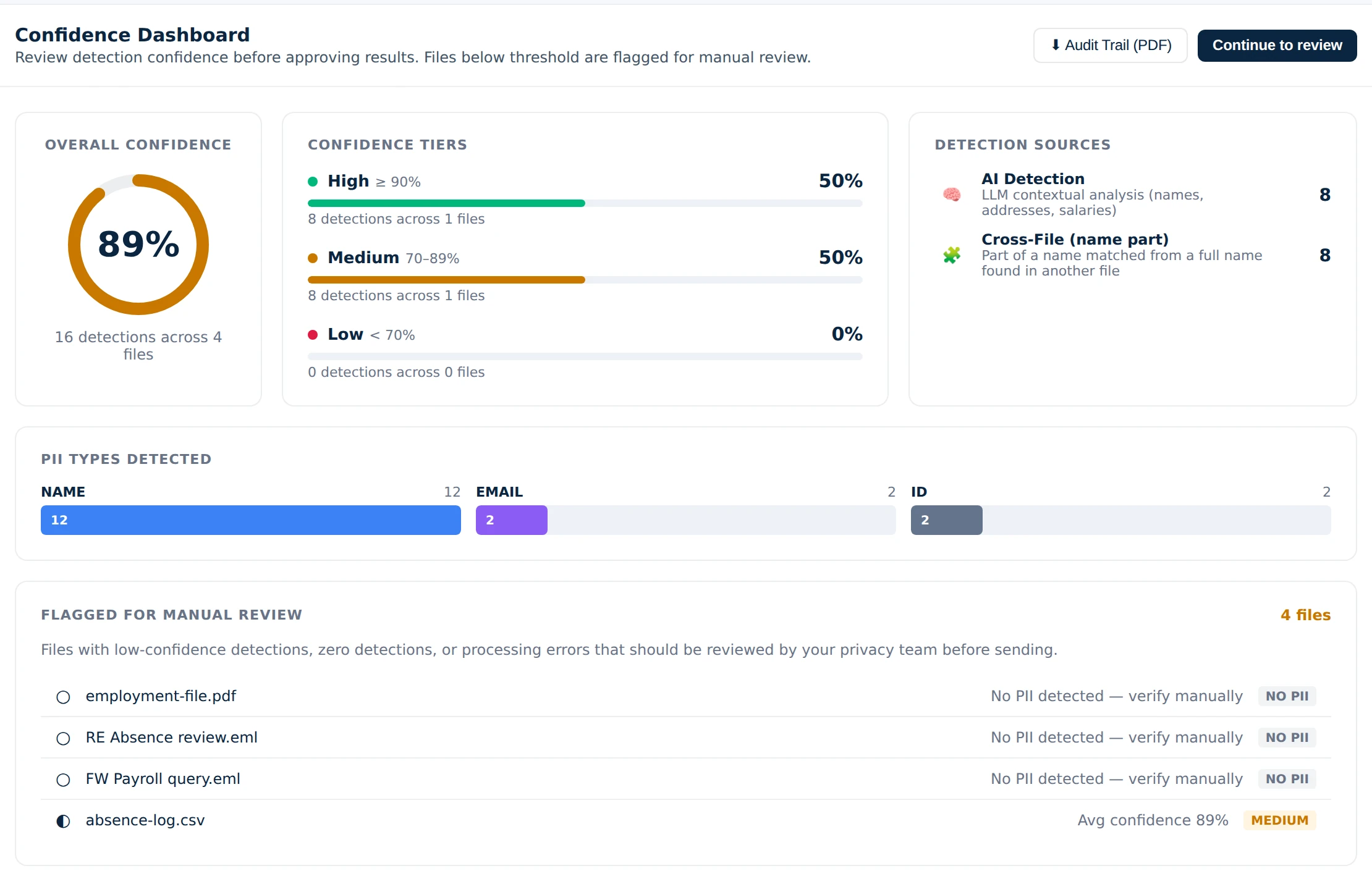
Detections are tiered by confidence and traced to their source. Files that need a human eye, low confidence, no detections or a processing failure, are listed before review begins.

What the export proves
Confidence
SafeRedact confidence dashboard showing overall confidence, detections by tier, detection sources and files flagged for manual review

Trust

Nothing leaves the browser except text.

Extraction, OCR, review, redaction and export run in the tab. Only extracted text goes out for detection. Files never uploaded. No document storage.

Trust Center

Export

One download. Two folders.

The first goes to the requester. The second stays with you and answers the question a complaint or a tribunal will ask: what was redacted, by whom, and when.

hr-sar-2026-0417.zipas written by SafeRedact
disclosure-pack/        send to the requester
  _README.txt
  employment-file_redacted.pdf
  grievance-2025_redacted.pdf
  inbox-export/
    RE Absence review_redacted.eml
    FW Payroll query_redacted.eml
    ... 2,312 more
internal-audit/         keep in-house
  _README.txt
  audit-trail.csv
  review-decision-log.csv
  detection-report.csv
  subject-preservation-summary.txt
  processing-failures.csv

Getting started

From evaluation to a live case.

01

Evaluation

Tell us the export shape and volume. We confirm fit and put the data processing agreement in place.

02

Pilot on a real case

Your team runs one live request end to end: load, name the subject, review, attest, export.

03

Per-case pricing

Each case after that is priced by document count, not pages, and quoted on your export.

11 file typesMailboxes first
PST, PDF, DOCX, XLSX, EML, MSG, HTML, TXT, CSV, JSON, ZIPScanned pages are OCR'd on your machine. Attachments inside emails are extracted and scanned. Redactions are burned into PDF output.

FAQ

Questions buyers ask.

What is SafeRedact?
SafeRedact is browser-based redaction software for data subject access requests. It takes the export from a request, such as a Microsoft Purview package, a PST mailbox or a SharePoint folder, detects personal data across the whole set, preserves the data subject's own information, and produces a disclosure pack with an audit trail after a reviewer has decided every detection.
Does SafeRedact work with Microsoft 365 and Purview exports?
Yes. Export mailboxes from Purview as PSTs with the package size set to 1 GB or 2 GB, and documents as a ZIP. SafeRedact unpacks both in the browser: each mailbox becomes individual messages with their attachments, and the whole export runs as one case.
Is the data subject's own information redacted?
No. You enter the requester's name, contact details and reference numbers once, and SafeRedact keeps that information readable throughout the pack. Other people's personal data is redacted.
Where are documents processed and what is retained?
Documents are read and redacted in your browser and are never uploaded. Only extracted text is sent for detection. On the standard route that text is never used for training and is deleted within 30 days. On the EU route, detection runs on AWS infrastructure within the UK and EU (European regions including London) and the text is not stored or logged by the AI provider.
How is SafeRedact priced?
Per case, by document count rather than pages, quoted on your export. A pilot runs one real case under a signed data processing agreement.

Have one document, not a case?

SafeRedact Personal redacts a single PDF or image in your browser. Free with a watermark, or a day pass to remove it.

Run your next subject access request through it.

One real case under a signed data processing agreement, with support through the first week.